
The Hidden Cost of Poor Workstation Design: How Businesses Lose Productivity Without Realizing It
Introduction Most organizations invest heavily in technology, software, office space, and employee training. However, one critical area is often overlooked: workstation design. Many companies focus on acquiring the latest laptops, high-performance computers, and collaboration tools while ignoring how employees physically interact with these systems every day. Poor workstation design can quietly impact productivity, employee well-being, focus, and workplace efficiency. Whether it's an IT company, financial institution, engineering firm, healthcare facility, customer support center, design studio, or home office, the way a workstation is configured has a direct effect on performance. Today, ergonomic workspace solutions such as monitor arms, monitor stands, laptop mounts, cable management systems, and adjustable workstation accessories are becoming essential components of modern workplace design.
MONITOR ARMS IN INDIA
Singularity India - Monitor Arms
6/2/20264 min read
The Hidden Cost of Poor Workstation Design: How Businesses Lose Productivity Without Realizing It
Introduction
Most organizations invest heavily in technology, software, office space, and employee training. However, one critical area is often overlooked: workstation design.
Many companies focus on acquiring the latest laptops, high-performance computers, and collaboration tools while ignoring how employees physically interact with these systems every day. Poor workstation design can quietly impact productivity, employee well-being, focus, and workplace efficiency.
Whether it's an IT company, financial institution, engineering firm, healthcare facility, customer support center, design studio, or home office, the way a workstation is configured has a direct effect on performance.
Today, ergonomic workspace solutions such as monitor arms, monitor stands, laptop mounts, cable management systems, and adjustable workstation accessories are becoming essential components of modern workplace design.
Why Workstation Design Matters More Than Ever
The average office professional spends between 7 and 10 hours daily in front of a screen.
Software developers review code for hours.
Traders monitor multiple charts and market feeds.
Designers work across several applications simultaneously.
Support teams spend entire shifts interacting with customer systems.
When monitors, keyboards, and accessories are positioned incorrectly, employees often experience:
Neck strain
Back discomfort
Eye fatigue
Shoulder pain
Wrist stress
Reduced concentration
Over time these issues affect not only employee health but also workplace productivity.
The Modern Workspace Challenge
Today's professionals rarely work with a single application.
A typical employee may use:
Email
CRM software
Collaboration tools
Video conferencing platforms
Spreadsheets
Business dashboards
Web browsers
As workloads become increasingly digital, multi-monitor workstations have become standard across many industries.
Unfortunately, many desks still rely on fixed monitor stands that offer little flexibility.
This creates a disconnect between technology investment and actual user experience.
Common Problems Found in Office Workstations
Monitors Positioned Too Low
One of the most common workplace issues is improper monitor height.
When displays are placed too low:
Users lean forward
Neck muscles remain under tension
Posture deteriorates
This can lead to long-term discomfort.
Insufficient Desk Space
Traditional monitor stands occupy valuable workspace.
Employees often struggle to find room for:
Documents
Laptops
Keyboards
Notebooks
Accessories
A crowded desk can negatively impact workflow and organization.
Poor Multi-Monitor Alignment
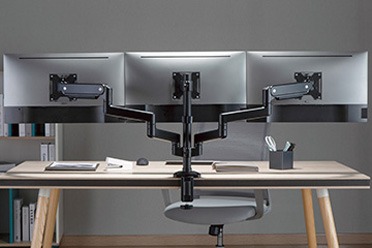
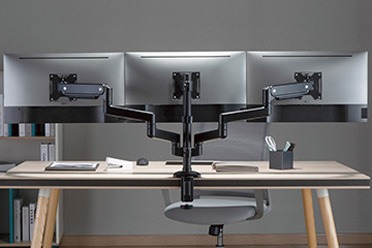
In dual monitor setups, triple monitor workstations, and quad monitor environments, screen alignment becomes increasingly important.
Improper positioning forces excessive head movement and creates unnecessary strain.
Cable Clutter
Workstations often contain:
Monitor cables
Charging cables
USB devices
Network connections
Without cable management, desks quickly become cluttered and difficult to maintain.
How Monitor Arms Solve These Problems
Monitor arms have become one of the most effective workstation upgrades available today.
Unlike fixed monitor stands, monitor arms provide complete flexibility.
Users can:
Raise monitors
Lower monitors
Extend displays
Rotate screens
Adjust viewing angles
Create custom multi-monitor layouts
This flexibility enables employees to create workstations tailored to their specific needs.
Benefits of Monitor Arms
Better Ergonomics
Monitor arms position displays at eye level, helping users maintain a neutral posture.
Benefits include:
Reduced neck strain
Improved comfort
Better posture
Less fatigue
Increased Productivity
When screens are positioned correctly, employees spend less time adjusting their posture and more time focusing on work.
Dual monitor arms and multi-monitor setups can significantly improve workflow efficiency.
Improved Workspace Organization
Monitor arms free desk space by lifting screens above the work surface.
This creates room for:
Laptops
Documents
Desk accessories
Collaborative work
Enhanced Flexibility
Different employees work differently.
Monitor arms allow users to customize screen positions according to their preferences.
Why IT Companies Are Adopting Monitor Arms
Technology companies increasingly deploy monitor arms across:
Software development teams
Testing departments
DevOps teams
Support centers
Network operations centers
Developers often work with:
Multiple code windows
Documentation
Communication platforms
Dual monitor arms and triple monitor setups help improve productivity and reduce window switching.
Monitor Arms in Financial Trading Environments
Professional trading desks frequently utilize:
Dual monitor arms
Triple monitor arms
Quad monitor mounts
Heavy-duty monitor arms
Traders monitor:
Charts
News feeds
Market depth
Research tools
Proper monitor positioning improves visibility and supports better decision-making.
Monitor Arms in Healthcare and Laboratories
Healthcare facilities increasingly use monitor arms for:
Diagnostic workstations
Laboratory systems
Medical records access
Imaging review stations
Benefits include:
Better ergonomics
Flexible screen positioning
Improved workspace cleanliness
Monitor Arms for Hybrid and Remote Work
The rise of remote work has transformed home offices.
Many professionals now invest in:
Monitor arms
Laptop stands
Ergonomic accessories
Cable management systems
A well-designed home workstation can dramatically improve comfort and productivity.
Choosing the Right Monitor Arm
Several factors should be considered when selecting monitor arms:
Screen Size
Choose monitor arms compatible with your display size.
Weight Capacity
Verify that the monitor arm supports the monitor weight.
VESA Compatibility
Most monitors use:
75 × 75 mm
100 × 100 mm
VESA mounting patterns.
Mounting Method
Options include:
Desk clamp monitor arms
Grommet monitor arms
Wall mount monitor arms
Freestanding monitor stands
Gas Spring vs Mechanical Spring
Gas spring monitor arms provide smoother movement and effortless adjustment.
Mechanical spring monitor arms offer reliable support and cost-effective performance.
The Business Case for Ergonomic Investments
Organizations that invest in ergonomic workspace solutions often benefit from:
Improved employee comfort
Better workstation utilization
Enhanced workplace aesthetics
Increased productivity
Greater employee satisfaction
Monitor arms represent one of the simplest and most impactful upgrades available for modern workspaces.
Future Workspaces Will Be More Flexible
As offices continue evolving, flexible workstation design will become increasingly important.
Emerging trends include:
Hybrid work environments
Activity-based workspaces
Shared desks
Smart offices
Collaborative workstations
Monitor arms, monitor mounts, laptop holders, and ergonomic accessories will play a central role in supporting these modern workplace models.
Conclusion
Poor workstation design can quietly reduce productivity, increase discomfort, and create inefficient work environments. Modern ergonomic solutions such as monitor arms, monitor stands, dual monitor mounts, triple monitor setups, quad monitor arms, laptop holders, and cable management systems help businesses create healthier and more productive workspaces.
Whether you're building an IT office, trading desk, engineering center, healthcare facility, customer support department, or home office, investing in ergonomic workstation solutions is an investment in long-term performance.
At Singularity India, we provide monitor arms, gas spring monitor arms, mechanical spring monitor arms, heavy-duty monitor mounts, dual monitor stands, triple monitor arms, quad monitor mounts, laptop holders, workstation accessories, and ergonomic workspace solutions designed to support the needs of modern professionals across India.
Connect
+91-7838640002, +91-9810502349
© 2025. All rights reserved.