
Monitor Arms: The Complete Guide to Choosing the Right Monitor Arm for Your Workspace
A monitor arm is more than just a way to hold your monitor. The right monitor arm can improve your desk setup, free up valuable workspace, improve screen positioning, and make long hours at a computer more comfortable. Whether you are setting up a home office, corporate workspace, trading desk, design studio, gaming setup, or healthcare workstation, choosing the right monitor arm depends on your monitor size, weight, number of screens, desk configuration, and how you use your workspace.
MONITOR ARMS IN INDIA
Singularity India
8/18/20266 min read

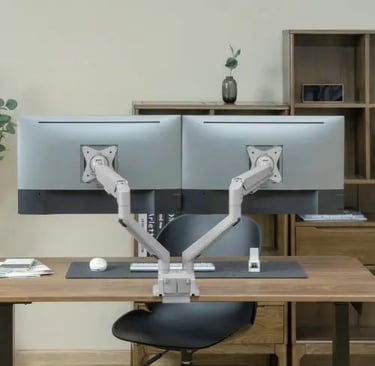
What Is a Monitor Arm?
A monitor arm is a mounting system that attaches a computer monitor to a desk, wall, or other supporting surface. Instead of placing the monitor directly on its original stand, a monitor arm allows you to adjust the screen's height, viewing angle, distance, and orientation.
Most modern monitor arms support the VESA mounting standards of 75 × 75 mm and 100 × 100 mm, making them compatible with a wide range of monitors.
Depending on the model, a monitor arm may provide:
Height adjustment
Tilt adjustment
Swivel adjustment
Screen rotation
Extension and retraction
Cable management
VESA quick-release functionality
Desk clamp or grommet mounting
Why Should You Use a Monitor Arm?
1. Better Ergonomics
One of the biggest advantages of a monitor arm is the ability to position the screen at a comfortable height and viewing distance.
Ideally, the top portion of your monitor should be around eye level, allowing you to work without constantly bending your neck downward.
This can be particularly useful for professionals who spend several hours every day working on computers.
2. More Desk Space
Traditional monitor stands can occupy a significant portion of your desk.
A monitor arm transfers the monitor's support point to the edge or mounting point of the desk, leaving more usable space underneath the screen.
The additional space can be useful for:
Keyboards
Notebooks
Documents
Accessories
Laptops
Other office equipment
3. Flexible Screen Positioning
A fixed monitor stand gives you limited adjustment.
With an adjustable monitor arm, you can move the monitor closer when working on detailed tasks or push it farther away when you need more desk space.
Many articulating monitor arms also allow you to rotate the screen between landscape and portrait orientation.
4. Cleaner Workspace
Monitor arms can help create a more organized desk setup by reducing the amount of equipment sitting directly on the desk.
Many models also include integrated cable management, helping route monitor cables along the arm rather than leaving them scattered across the workspace.
Types of Monitor Arms
Different workspaces require different types of monitor arms.
Single Monitor Arm
A single monitor arm is designed to support one monitor.
It is a good choice for:
Home offices
Individual workstations
Reception desks
Compact desks
General office use
Single monitor arms are available in different weight capacities and adjustment mechanisms, including gas spring and mechanical spring designs.
Dual Monitor Arm
A dual monitor arm supports two monitors on the same mounting system.
It is particularly useful for:
Software developers
Financial traders
Data analysts
Designers
Content creators
Office professionals
Using two monitors can make it easier to compare information, keep communication tools open, or work across multiple applications.
Triple and Quad Monitor Arms
For professionals who require multiple displays, triple and quad monitor arms provide a centralized mounting solution.
These setups are commonly used in environments such as trading desks, monitoring stations, control rooms, professional workstations, and specialized offices.
When choosing a multi-monitor arm, pay particular attention to the combined weight of the monitors and the available desk space.
Gas Spring vs Mechanical Spring Monitor Arms
Not all monitor arms use the same adjustment mechanism.
Gas Spring Monitor Arms
Gas spring monitor arms use a gas-assisted mechanism to help balance the weight of the monitor.
They generally provide smooth movement and are particularly useful when the monitor needs to be repositioned frequently.
They are commonly available for standard and large monitors, including many curved displays.
Mechanical Spring Monitor Arms
Mechanical spring monitor arms use a mechanical spring mechanism to support the monitor.
They can provide reliable height and position adjustment and are available in a wide range of configurations and weight capacities.
The correct choice depends on the monitor's weight, the frequency of adjustment, and the intended application.
How to Choose the Right Monitor Arm
Before purchasing a monitor arm, check these five factors.
1. Monitor Size
Check the monitor size supported by the monitor arm.
For example, some models are designed for standard 17–32 inch monitors, while heavy-duty models can support much larger displays.
Large curved monitors require particular attention to both size and weight specifications.
2. Monitor Weight
This is one of the most important specifications.
Do not select a monitor arm based only on screen size.
Check the actual monitor weight without its original stand and compare it with the monitor arm's supported weight range.
For example, a monitor arm rated for 2–9 kg should not be used with a monitor weighing more than its specified maximum capacity.
3. VESA Compatibility
Check the mounting pattern on the back of your monitor.
The most common VESA patterns are:
75 × 75 mm
100 × 100 mm
Some monitors may require a VESA adapter if they do not have a standard mounting pattern.
4. Desk Thickness and Mounting Method
Monitor arms commonly use:
C-clamps
Grommet mounts
Other specialized mounting systems
Before installation, check whether your desk can safely support the selected mounting method.
Desk thickness and construction are particularly important when installing heavy-duty monitor arms.
5. Number of Monitors
Choose the configuration according to your requirements:
One monitor: Single monitor arm
Two monitors: Dual monitor arm
Three monitors: Triple monitor arm
Four monitors: Quad monitor arm
If you plan to add additional displays in the future, choosing a suitable multi-monitor solution from the beginning may be more practical.
Monitor Arm for Curved and Large Monitors
Large and curved monitors require additional consideration.
A curved monitor may place more leverage on the mounting system because of its size and weight distribution.
Before purchasing, check:
Monitor weight
Monitor dimensions
VESA pattern
Maximum supported screen size
Maximum supported weight
Arm reach
Desk mounting capacity
For particularly large displays, a heavy-duty monitor arm may be more appropriate than a standard monitor arm.
Monitor Arms for Corporate Workspaces
Monitor arms can be particularly useful in corporate environments where multiple workstations need to maintain a consistent and organized layout.
They can help organizations create cleaner desks while providing employees with greater flexibility in monitor positioning.
Monitor arms are commonly used in:
IT offices
BPO and call centers
Trading floors
Design studios
Engineering workstations
Control rooms
Healthcare environments
Reception areas
Meeting rooms
For large deployments, organizations should also consider installation requirements, warranty, availability of spare parts, and after-sales support.
How to Install a Monitor Arm
Although installation varies by model, the general process is:
Select a suitable mounting position on the desk.
Install the desk clamp or grommet mount.
Secure the monitor arm to the mounting base.
Attach the VESA plate to the monitor.
Connect the monitor to the arm.
Adjust the arm tension according to the monitor weight.
Set the monitor height and viewing angle.
Route cables through the cable-management system.
Always follow the installation instructions supplied with the specific monitor arm.
Common Mistakes to Avoid
Choosing Based Only on Monitor Size
A 34-inch monitor can weigh very differently from another 34-inch monitor.
Always check weight capacity.
Ignoring VESA Compatibility
A monitor may not have a standard VESA mounting pattern. Check this before purchasing.
Overloading the Desk
A heavy-duty monitor arm and a heavy monitor can place significant load on a desk.
Make sure the desk surface and mounting area are strong enough.
Incorrect Spring Tension
If the arm moves upward or downward unexpectedly, the tension may need adjustment according to the manufacturer's instructions.
Poor Cable Management
A well-designed monitor arm should be installed with the cables routed properly so that movement of the arm does not pull or strain the cables.
Frequently Asked Questions
Are monitor arms universal?
Not completely. Compatibility depends on the monitor's VESA pattern, weight, size, and the specifications of the monitor arm.
Can a monitor arm hold a curved monitor?
Yes. Many monitor arms support curved monitors, but you must check the maximum supported weight and screen size before installation.
Is a dual monitor arm better than two single monitor arms?
It depends on the workspace. A dual monitor arm can provide a cleaner and more centralized setup, while two single arms can offer greater independent positioning flexibility.
Can I use a monitor arm without a VESA mount?
Some monitors require a separate non-VESA adapter. Check the monitor manufacturer's specifications and choose a compatible adapter where necessary.
Are monitor arms suitable for office use?
Yes. Monitor arms are widely used in corporate and professional workspaces because they can improve desk organization and allow users to adjust their screens according to their working position.
Conclusion
Choosing the right monitor arm requires more than simply selecting a model based on appearance or monitor size.
Consider your monitor's weight, screen size, VESA pattern, number of displays, desk construction, and required range of movement before making a decision.
For a standard workstation, a single monitor arm may be sufficient. For professionals working with multiple screens, dual, triple, or quad monitor arms can provide a more organized and flexible setup. Large and heavy displays may require a heavy-duty monitor arm with a higher weight capacity.
At Singularity India, we provide a range of LUMI monitor arms and mounting solutions for corporate offices, professional workstations, trading desks, design studios, gaming setups, and other applications.
Explore our range of single, dual, triple, quad, gas spring, and heavy-duty monitor arms to find a solution suited to your workspace.
Singularity India — Professional Monitor Mounting Solutions for Modern Workspaces.
Connect
+91-7838640002, +91-9810502349
© 2025. All rights reserved.