
How Ergonomic Workstations Help Businesses Improve Employee Productivity
Employee productivity is influenced by many factors—technology, workflow, office design, and workplace comfort. While companies invest heavily in laptops, software, and infrastructure, one critical aspect is often overlooked: workstation ergonomics. Poor desk setups can lead to discomfort, fatigue, reduced concentration, and long-term health issues. This is why businesses across industries are increasingly investing in ergonomic workspace solutions such as monitor arms, adjustable workstations, and organized desk environments. At Singularity India, we help organizations create smarter and more ergonomic workspaces using advanced monitor arms in India and workspace accessories designed for modern office environments.
MONITOR ARMS IN INDIA
5/9/20263 min read
What Is an Ergonomic Workstation?
An ergonomic workstation is designed to support natural body posture and reduce physical strain during work. It allows employees to work comfortably for extended periods while maintaining efficiency and focus.
A properly designed workstation includes:
Correct monitor positioning
Comfortable viewing angles
Organized desk layouts
Flexible screen adjustments
Reduced clutter and cable congestion
One of the most important components of this setup is the monitor arm.
Why Traditional Monitor Setups Create Problems
Most traditional monitor stands offer very limited adjustment. As a result:
Screens are often too low or too high
Employees lean forward or strain their necks
Desk space becomes cluttered
Multi-screen setups become difficult to manage
Over time, this leads to:
Neck and back pain
Eye strain
Reduced productivity
Employee discomfort and fatigue
Modern ergonomic monitor arms solve these issues effectively.
How Monitor Arms Improve Workplace Ergonomics
1. Better Posture and Reduced Strain
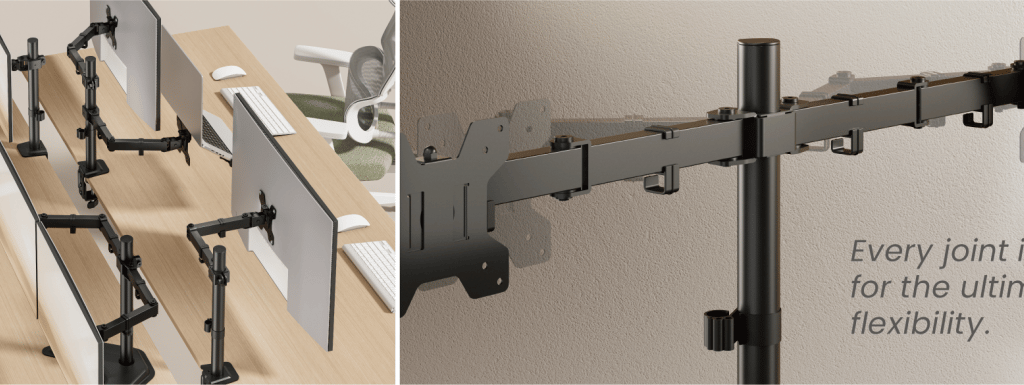
Single monitor arms and dual monitor arms allow users to position displays at eye level. This helps maintain a neutral posture and minimizes stress on the neck and shoulders.
2. Flexible Screen Adjustments
Gas spring monitor arms provide smooth movement and effortless adjustment. Users can easily change screen height, tilt, and viewing angle according to their comfort.
3. Improved Desk Space Utilization
Desk mount monitor arms lift monitors off the desk surface, creating more usable space. This results in cleaner and more organized workstations.
4. Enhanced Multi-Tasking
Professionals working with multiple applications benefit significantly from dual monitor arms, triple monitor arms, and quad monitor arms. These setups improve workflow visibility and reduce time lost switching between windows.
5. Professional Workspace Appearance
Integrated cable management and structured monitor positioning create a clean and modern office environment.
Why Ergonomics Matters for Businesses
Increased Productivity
Comfortable employees work more efficiently. Reduced physical strain allows teams to stay focused for longer periods.
Reduced Workplace Fatigue
Proper monitor positioning reduces discomfort caused by prolonged screen usage.
Better Employee Experience
Modern ergonomic workstations improve overall workplace satisfaction and support employee well-being.
Optimized Office Space
Monitor arms help businesses maximize desk space without increasing office footprint.
Industries Benefiting from Ergonomic Workstations
IT & Software Companies
Developers and engineers often work long hours across multiple applications. Ergonomic multi-screen setups improve efficiency significantly.
Finance & Trading
Traders require multiple displays positioned precisely for fast decision-making.
Design & Creative Studios
Designers benefit from flexible monitor positioning and larger screen layouts.
Operations & Control Rooms
Multi-monitor environments require stable and adjustable mounting systems for continuous monitoring.
Home Offices
Remote professionals increasingly invest in ergonomic workstations to improve comfort and productivity.
Choosing the Right Monitor Arm
When selecting a monitor arm, businesses should consider:
Monitor size and weight
Number of displays required
Type of setup (single, dual, triple, quad)
Gas spring vs fixed arm
Desk mount vs wall mount
Future scalability
Choosing the right solution ensures long-term usability and workspace efficiency.
Why Businesses Choose Singularity India
Singularity India offers a complete range of:
Single monitor arms
Dual monitor arms
Triple monitor arms
Quad monitor arms
Gas spring monitor arms
Heavy duty monitor arms
Desk mount and wall mount monitor arms
We also provide:
Laptop trays
Cable management solutions
Non-VESA adapters
Installation support and pan-India delivery
Our solutions are designed to help businesses build efficient, ergonomic, and future-ready workspaces.
The Future of Workplace Design
As organizations continue to focus on employee productivity and well-being, ergonomic workstations will become a standard rather than an upgrade.
Modern workspaces are moving toward:
Flexible desk environments
Multi-monitor setups
Clean and organized layouts
Adjustable ergonomic infrastructure
Monitor arms play a central role in this transformation.
Conclusion
Investing in ergonomic workspace solutions is not just about comfort—it directly impacts productivity, efficiency, and employee experience.
By using high-quality monitor arms in India, businesses can create healthier, cleaner, and more productive work environments.
With a wide range of ergonomic solutions and professional workspace products, Singularity India continues to support organizations in building smarter offices designed for modern work demands.
Connect
+91-7838640002, +91-9810502349
© 2025. All rights reserved.