
Health Benefits of Using Monitor Arms in Modern Workspaces
Why Ergonomics Matters More Than Ever Modern professionals spend long hours in front of computer screens. Whether working in corporate offices, home office environments, trading desks, programming setups, customer support centers, gaming stations, or creative studios, improper monitor positioning can lead to serious physical discomfort over time.
MONITOR ARMS IN INDIA
Singularity India
5/26/20263 min read
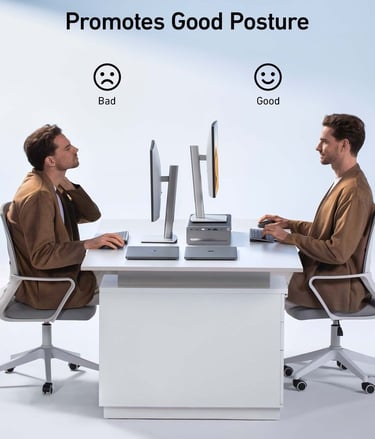
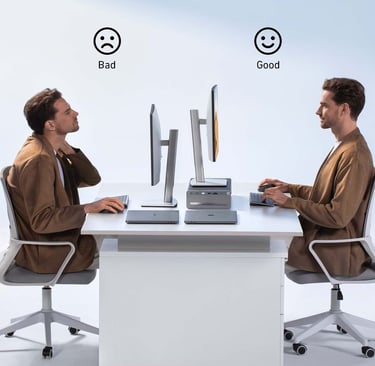
Why Ergonomics Matters More Than Ever
Modern professionals spend long hours in front of computer screens. Whether working in corporate offices, home office environments, trading desks, programming setups, customer support centers, gaming stations, or creative studios, improper monitor positioning can lead to serious physical discomfort over time.
Poor posture, incorrect screen height, and limited viewing flexibility often contribute to:
Neck strain
Shoulder pain
Eye fatigue
Back discomfort
Wrist tension
Reduced concentration
Lower productivity
One of the simplest and most effective ways to improve workstation ergonomics is by using a monitor arm.
Monitor arms are no longer just workspace accessories — they have become an essential ergonomic upgrade for healthier and more productive work environments.
What Is a Monitor Arm?
A monitor arm is an adjustable mounting system designed to securely hold computer monitors while allowing flexible positioning and movement.
Unlike fixed monitor stands, monitor arms provide:
Height adjustment
Tilt adjustment
Swivel movement
Screen rotation
Extension and retraction
Multi-monitor positioning
These adjustments help users position monitors exactly where they are most comfortable and ergonomically beneficial.
1. Reduces Neck Strain
One of the biggest health benefits of monitor arms is reduced neck strain.
Many users work with monitors positioned too low, forcing them to bend their neck downward for extended periods. Over time, this posture creates stress on the cervical spine and surrounding muscles.
A monitor arm allows users to:
Raise the monitor to eye level
Maintain a neutral neck position
Reduce constant downward head movement
Proper screen height helps minimize tension in the neck and upper back, especially during long working hours.
2. Improves Posture
Poor monitor placement often causes users to lean forward, slouch, or twist their body unnaturally while working.
Monitor arms help create proper ergonomic alignment by encouraging:
Upright sitting posture
Balanced shoulder positioning
Proper spinal alignment
Comfortable viewing angles
When monitors are positioned correctly:
The spine remains more neutral
Pressure on the lower back is reduced
Sitting posture becomes healthier and more sustainable
Good posture is essential for long-term workplace wellness.
3. Reduces Eye Fatigue
Improper monitor distance and viewing angles can contribute to digital eye strain.
Symptoms often include:
Dry eyes
Blurred vision
Headaches
Eye fatigue
Difficulty focusing
Monitor arms allow users to:
Adjust viewing distance easily
Reduce glare from lighting
Position screens at comfortable angles
Optimize monitor height for natural eye movement
This helps create a more comfortable visual experience throughout the workday.
4. Supports Better Productivity
Comfort directly affects productivity.
When users constantly adjust their seating position or experience discomfort, concentration and workflow efficiency decrease.
Monitor arms improve productivity by:
Creating cleaner desk layouts
Allowing faster screen repositioning
Supporting multi-monitor workflows
Improving viewing comfort
Reducing physical distractions
Professionals working in:
Software development
Financial trading
Video editing
Customer support
Data analysis
Graphic design
Gaming and streaming
often benefit significantly from ergonomic monitor positioning.
5. Maximizes Desk Space
Traditional monitor stands occupy valuable desk space and limit workstation flexibility.
Monitor arms help:
Free desk surface area
Improve workspace organization
Reduce cable clutter
Create cleaner desk layouts
This is especially useful for:
Compact workstations
Shared desks
Multi-monitor environments
Productivity-focused setups
An organized workspace often contributes to better focus and reduced mental fatigue.
6. Encourages Movement and Flexibility
Static working positions can increase body stiffness and fatigue.
Monitor arms make it easy to:
Change screen positions throughout the day
Alternate between sitting positions
Share screens during meetings
Reconfigure desk layouts quickly
This flexibility encourages healthier movement patterns during work.
7. Ideal for Multi-Monitor Workstations
Many professionals now use dual, triple, or quad monitor setups.
Without proper mounting systems, multiple monitors can:
Create poor viewing angles
Force awkward neck rotation
Increase desk clutter
Monitor arms help align multiple screens ergonomically for:
Better workflow efficiency
Reduced head movement
Improved posture
More comfortable multitasking
This is particularly beneficial for:
Traders
Programmers
Designers
Editors
Security monitoring stations
IT professionals
8. Helps Create Healthier Home Offices
Remote and hybrid work environments have increased the importance of ergonomic home office setups.
Many home workstations are not ergonomically optimized, leading to discomfort over time.
Monitor arms provide an affordable and effective way to:
Upgrade home workspaces
Improve posture
Reduce physical strain
Increase work comfort
A healthier home office setup can significantly improve long-term work quality and well-being.
Choosing the Right Monitor Arm
When selecting a monitor arm, important factors include:
Monitor size compatibility
Weight capacity
Gas spring or mechanical spring adjustment
VESA compatibility
Desk mounting options
Cable management
Single or multi-monitor support
Different users require different ergonomic solutions depending on their workspace and workflow needs.
Why Businesses Are Investing in Ergonomic Workspaces
Companies increasingly recognize the importance of employee wellness and ergonomic infrastructure.
Ergonomic workspace upgrades can help:
Improve employee comfort
Reduce physical strain
Enhance productivity
Support healthier work habits
Improve workspace aesthetics
Monitor arms are now widely used across:
Corporate offices
IT companies
Trading floors
Healthcare facilities
Educational institutions
Design studios
Gaming environments
Build a Better Workspace with Singularity India
Singularity India offers a wide range of monitor arms and ergonomic workspace solutions designed for modern work environments.
Our product range includes:
Single Monitor Arms
Dual Monitor Arms
Triple Monitor Mounts
Quad Monitor Stands
Gas Spring Monitor Arms
Heavy-Duty Monitor Arms
Wall Mount Monitor Arms
Ergonomic Workspace Accessories
Whether you are building a professional workstation, upgrading a home office, or designing a multi-monitor productivity setup, ergonomic monitor mounting solutions can help create a healthier and more efficient workspace.
Investing in proper monitor ergonomics is not just about comfort — it is about long-term health, productivity, and workplace performance.
Connect
+91-7838640002, +91-9810502349
© 2025. All rights reserved.